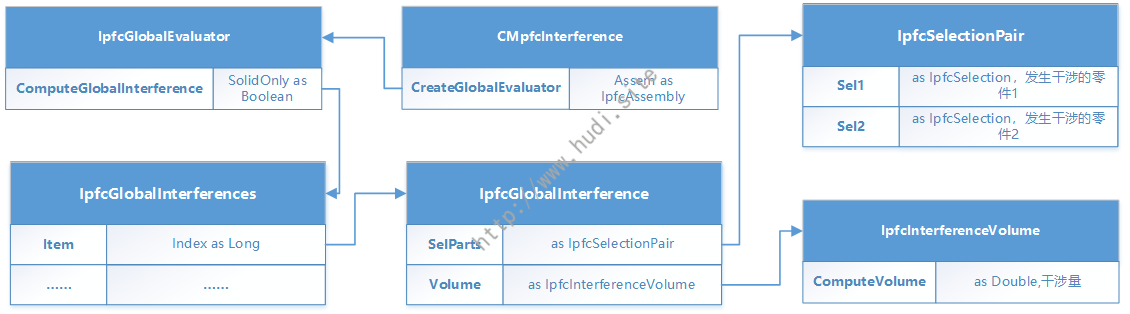
Dim asm As IpfcModel Dim globalEvaluator As IpfcGlobalEvaluator Dim globalInterferences As IpfcGlobalInterferences Dim selParts As IpfcSelectionPair Dim sel1, sel2 As IpfcSelection Dim selItem1, selItem2 As IpfcModel Dim volume As IpfcInterferenceVolume Dim ret AsString = ""
asm = asyncConnection.Session.CurrentModel If asm.Type = EpfcModelType.EpfcMDL_ASSEMBLY Then globalEvaluator = (New CMpfcInterference).CreateGlobalEvaluator(CType(asm, IpfcAssembly)) globalInterferences = globalEvaluator.ComputeGlobalInterference(True) IfNot (globalInterferences IsNothing) Then ForEach interference As IpfcGlobalInterference In globalInterferences selParts = interference.SelParts sel1 = selParts.Sel1 sel2 = selParts.Sel2 selItem1 = sel1.SelModel selItem2 = sel2.SelModel volume = interference.Volume ret = ret + selItem1.InstanceName + "和" + selItem2.InstanceName + "发生干涉,干涉量为:" + volume.ComputeVolume.ToString() + Chr(13) Next Else ret = asm.InstanceName + "未发生干涉." EndIf EndIf
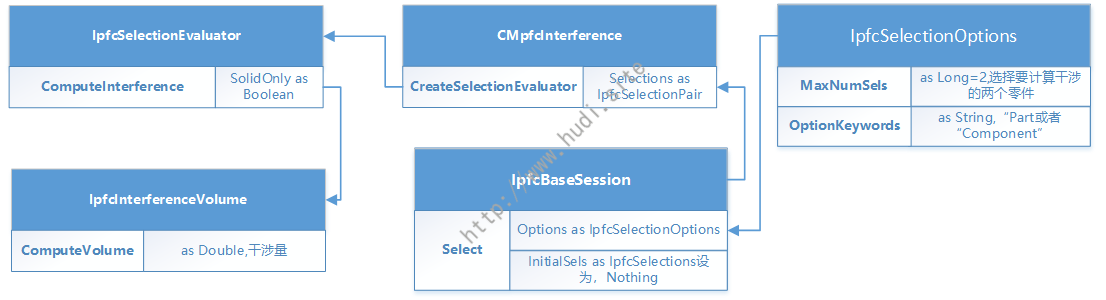
Dim selectionOptions As IpfcSelectionOptions Dim selections As CpfcSelections Dim selectionspair As IpfcSelectionPair Dim selectionEvaluator As IpfcSelectionEvaluator Dim asm As IpfcModel Dim interferenceVolume As IpfcInterferenceVolume Dim ret AsString = "" asm = asyncConnection.Session.CurrentModel '初始化selection选项 selectionOptions = (New CCpfcSelectionOptions).Create("part") '设置可选特征的类型,这里为零件 selectionOptions.MaxNumSels = 2'设置一次可选择特征的数量,这里判断两个零件的干涉,所以为2 selections = asyncConnection.Session.Select(selectionOptions, Nothing) '确定选择了两个对象 If selections.Count = 2Then selectionspair = (New CCpfcSelectionPair).Create(selections.Item(0), selections.Item(1)) selectionEvaluator = (New CMpfcInterference).CreateSelectionEvaluator(selectionspair) interferenceVolume = selectionEvaluator.ComputeInterference(True) ret = "干涉量为:" + interferenceVolume.ComputeVolume().ToString() + Chr(13) Else ret = "用户未完成选择!" EndIf