本文主要尝试搭建Solidworks C# 独立二次开发环境配置。具体二次开发的相关代码撰写还得边学编总结。
1.开发环境介绍
首先安装好Visual Studio和对应的.Net FrameWork 4.8版本,Solidworks二次开发包也要确保安装,总体和之前的addin模式环境一致:
- 主机操作系统:Windows 11 X64
- Visual Studio版本:Visual Studio 2026 社区版
- Solidworks版本:2020 X64
- .Net版本:.Net FrameWork 4.8
2. Visual Studio工程设置
独立程序只要添加引用即可,不需要修改其“嵌入互操作类型 (Embed Interop Types)”属性设为False。刚开始开发,只用添加Solidworks.Interop.sldworks.dll、Solidworks.Interop.swconst.dll、Solidworks.Interop.swpublished.dll三个核心库:
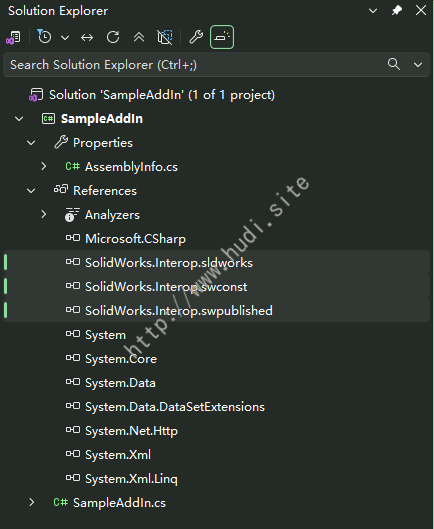
图3 添加Solidworks引用
3. 代码撰写
独立开发的代码其实就很简单了,无非是创建对象,调用相关对象进行操作,直接给出建立实例并打开文件的代码:
1
2
3
4
5
6
7
8
9
10
11
12
13
14
15
16
17
18
19
20
21
22
23
24
25
26
27
28
29
30
31
32
33
34
35
36
37
38
39
40
41
42
43
44
45
46
47
48
49
50
51
52
53
54
55
56
57
58
59
60
61
62
63
64
65
66
67
68
69
70
71
72
73
74
75
76
77
78
79
80
81
82
83
84
85
86
87
88
89
90
91
92
93
94
| using SolidWorks.Interop.sldworks;
using System;
using System.Windows.Forms;
namespace SampleExe
{
public partial class FrmMain : Form
{
private SldWorks _swApp = null;
public FrmMain()
{
InitializeComponent();
}
private void FrmMain_FormClosing(object sender, FormClosingEventArgs e)
{
if (_swApp != null)
{
try
{
_swApp.ExitApp();
System.Runtime.InteropServices.Marshal.ReleaseComObject(_swApp);
}
catch (Exception ex)
{
MessageBox.Show($"关闭SolidWorks异常:{ex.Message}", "提示", MessageBoxButtons.OK, MessageBoxIcon.Warning);
}
finally
{
_swApp = null;
}
}
}
private void BtnOpen_Click(object sender, EventArgs e)
{
OpenFileDialog openFileDialog1 = new OpenFileDialog();
openFileDialog1.Filter = "SolidWorks文件(*.prt;*.asm;*.drw;*.sldprt;*.sldasm;*.slddrw)|*.prt;*.asm;*.drw;*.sldprt;*.sldasm;*.slddrw|所有文件(*.*)|*.*";
openFileDialog1.Title = "选择SolidWorks零件/装配/工程图文件";
if (openFileDialog1.ShowDialog() == DialogResult.OK)
{
string filePath = openFileDialog1.FileName;
int error = 0;
int warning = 0;
if (_swApp == null)
{
_swApp = new SldWorks();
}
int docType;
string ext = System.IO.Path.GetExtension(filePath).ToLower();
switch (ext)
{
case ".prt":
case ".sldprt":
docType = 1;
break;
case ".asm":
case ".sldasm":
docType = 2;
break;
case ".drw":
case ".slddrw":
docType = 3;
break;
default:
MessageBox.Show("不支持的文件格式!");
return;
}
_swApp.OpenDoc6(filePath, docType, 1, "", ref error, ref warning);
_swApp.Visible = true;
if (error != 0)
{
MessageBox.Show($"打开失败,错误码:{error}");
}
}
}
}
}
|
完整代码可在Github.com下载。